Enjoy Valentine's Day with your tastebuds and your crafty hands! Here are some treats & meal ideas from the kitchen, plus craft ideas to share.
 String of hearts by aussiegall on Flickr
Snacks: Sweet Snack Mix from scrumdilly-do
Drink: Healthy Strawberry-Banana Smoothie from SimpleMakes (er, me!)
Dinner: Candlelight on a Budget from MyRecipes
Dessert: Valentine's Day Treat Hit List from TipNut
Handmade Valentine: Little Acorn Valentine from Little Acorn
Crafty Gift: Valentine's Treasures from Schlosser Designs
Decor: Origami Cherry Blossoms from The Flirty Guide
Comment for a chance to win February's giveaway: an adorable panda pillow from My Dear Darling!
Reading, doodling, embroidering, and sewing. It's been a crafty, inspired, month!
Just before I left, I finished reading The Creative Family (SUPER book, even for no-kids-yet families like mine!), and completed my first project by hanging the Inspiration Line above. I hope it becomes more "inspiring" as time goes on!
This blue fabric from the left side of the inspiration line is now an almost-complete cell phone holder: I used the pattern from Doodle Stitching (which is FULL of cute patterns and ideas, most of which I actually want to make!) and plan to modify it (different design) for an iPod case to make my husband next week.
This brights-on-muslin embroidery from the right side of the inspiration line is my new sampler: I tried out sorts of stitches taught in Doodle Stitching, some of them which I already knew but also lots that were new to me. The book is FULL of beautifully illustrated photographs to teach a great assortment of stitches, both decorative and practical.
...and you?
What's your crafty side been up to this last month? Any Christmas-gift projects you're beginning? Share about 'em here, and post photos in our flickr group!


Most crafters agree they have too much craft stuff lying around, but share an organizational problem: what to do with it all? A challenge & poll led to netizen crafters' brainstorming & creativity, plus some interesting stats!
The Mugful Story
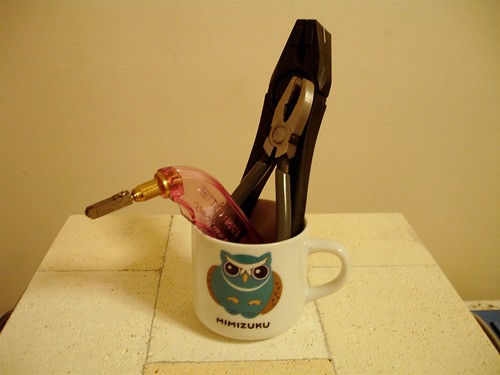
I recently began using mugs to store smaller, more frequently-accessed craft tools. This puts everything in one place while allowing me to add a fun, but functional, decor item to the room.
As I enjoyed my new crafting organization, I wondered: if all I kept to craft with had to fit in this mug, what would stay? What would go? The mug no longer just said "storage solution" to me, but also "simplify."
I asked online crafters how they would simplify their craftroom (or corner of the living room, or wherever) if they could only keep one mugful of craft tools. By “tools,” I excluded supplies (such as bolts of fabric) as well as equipment (like sewing machines).
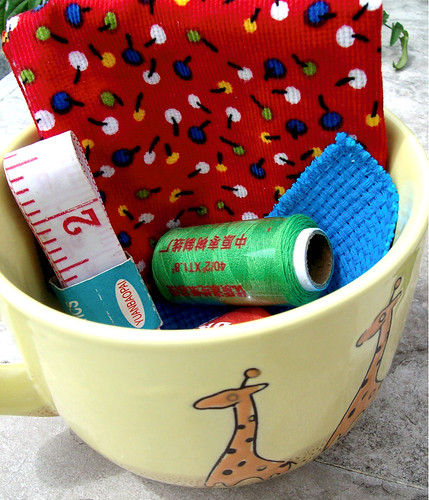
Some crafters posted a photo of their mugful:


Poll Results
Crafters at etsy.com, several flickr.com groups, and right here at www.SimpleMakes.com voted on the top 3 tools they’d have to keep.
The Top 3's Top 3:
Scissors (over half the crafters would include scissors), knife or other cutter, and, to my complete surprise (since I never use them in crafting), pliers!
Complete results (by % of crafters who'd include each in their top 3):
58% scissors
39% knife or cutter
32% pliers
25% writing utensil (pen, pencil, chalk)
25% ruler
21% knitting needles
18% tape measure
18% sewing or embroidery needles
14% seam ripper
14% paint brush
11% crochet hook
11% pincushion
7% small torch
4% hammer
4% chopstick
4% glue
4% stitch markers
Of course, responses were biased based on particular trades... I wouldn't suggest building a craft supply emporium based on these numbers! Do enjoy the stats, though; it's fun!
...and you?
Whether you do this as a mental exercise or actually pull out a mug, go through your stash, and try to stock it with just the essentials, it is a helpful activity that aids in simplification priority-making. Do you really need to keep all three size H crochet hooks?
Using the options in the poll results above, comment on this post with your top 3. If you take a photo, post it on our flickr group.
Enjoy!

Multicolr Search Lab - Idée Labs
 (+) Lets you put in up to 10 colors, even choosing which colors to receive more weight. You can even tweak it so as to choose any colors you want.
(-) Only 120 colors show up to choose from (but see tweak above). Search results included “all rights reserved” photos.
My finds: Using this site, I entered Simple Makes' theme colors and found Graduation(angle), top, and Graduation(fan), left, both by tanakawho
Color Fields Colr Pickr
(+) Neat groups you can click on (scroll down on page) to search photos of just that set: the “Macro” and “Doors and Windows” Colr Pickrs are especially fun. Lots of colors to choose from.
(-) Only based on one color, brought up “all rights reserved” as well as private photos you can’t actually click on.
I found: In my 5 minutes of play, none of the photos I liked were Creative Commons Licensed.
Flickr Color Selector
(+) Color code options (so you can literally pick any color).
(-) Only allows you to select one color, brought up “all rights reserved” and “photo not available” photos.
I found: Nothing Creative Commons Licensed.
Retrievr

(+) Definitely the most fun app I found. You get to sketch a drawing, and it matches it with flickr photos!
(-) Sometimes (not always) I couldn’t tell what the results had in common with my sketch. Brings up a set number of images, with no apparent option to see more. Doesn’t allow for very precise color selection. Results included “all rights reserved” and “private” images.
I found: soloist, left, by emdot
What I’d still like to see:
Idée Labs’ Multicolr Search Lab is my definite favorite. Building on its functionality that allows me to enter in my color scheme
* a checkbox to limit my search to only Creative Commons Licensed work
* a searchbox to search only within my terms (for this post, I might want a picture of a computer with flickr on the screen... so I’d like to type in “flickr computer” and just find relevant photos
* a searchbox where I can enter my username and only search MY photos
Lastly, an unimportant note for flickr tool designers:
* it’s really unnecessary to leave out vowels in the name of your webapp just because Flickr does so... just my opinion... :-)
...and you?
Are these tools practical, or just for fun? How can or do you use them to simplify home, or blog, design?

 Posts
Posts